Products
GT App
Pentarchy
Telegram Trading Agent
Backtest
AI Staking 3000
Company
About
Team
Advisors
$GTAIFor DevsFAQContacts
Buy $GTAI
Launch APP
LaunchApp
Stake $GTAI
GT APPGT AI (Beta)
← All articles
GTAI Token
  • What is GTAI?
  • How to stake $GTAI
Getting Started
  • How to start
  • How to connect your Binance account to GT App and to launch trading.
  • Simple ways to trade with GT App
  • Differences between Spot and Futures trading
  • Copy-Trading
  • How to launch the Futures strategy for Binance Futures trading
  • How to launch the strategy for Spot trading
  • How to connect your Telegram account to receive Telegram notifications and trading reports from your strategy
  • Memberships with profit commission
  • Quick Presets
  • Portfolio
  • How to become a Top-Trader
  • The GT APP Referral Program
  • GT App Security
  • I bought a copy trading subscription, but my copy trading strategy doesn't trade. Why?
  • Withdrawal policy
  • Trailing take profit deal completed with a loss
  • I have connection error. "Binance API is not responding"
  • How to launch several Futures strategies at the same time?
  • How to buy subscription?
  • Strategy doesn't start a deal after I click start a deal
  • How to find your API keys on exchanges
  • How can I earn a lot, and how can I do it right?
Trading Knowledge Base
  • Safety orders. Averaging of your position.
  • Futures trading: How to avoid liquidation? What to do if the price goes in the opposite direction against your opened position?
  • Future trading briefly
  • Trailing take-profit and deviation
  • Stop Loss
  • Deals
  • Trading terms
  • Safety order step multiplier
  • TradingView Chart
  • GT App Trading Signals
  • How to connect TradingView signals
  • Trend Changer
AI Backtest
  • GT AI Backtest — User Guide / Manual
  • FAQ GT AI Backtest
Troubleshooting
  • Troubleshooting
Funds & Fees
  • A simple way to register on Hyperliquid
  • Link your Hyperliquid to GT App account
  • Hyperliquid. Connectivety issues.
  • Replenishment of the balance and withdrawal
  • Trading fees
  • Refund policy
Knowledge Base · Getting Started

I have connection error. "Binance API is not responding"

By GT Protocol Team · Updated June 10, 2026

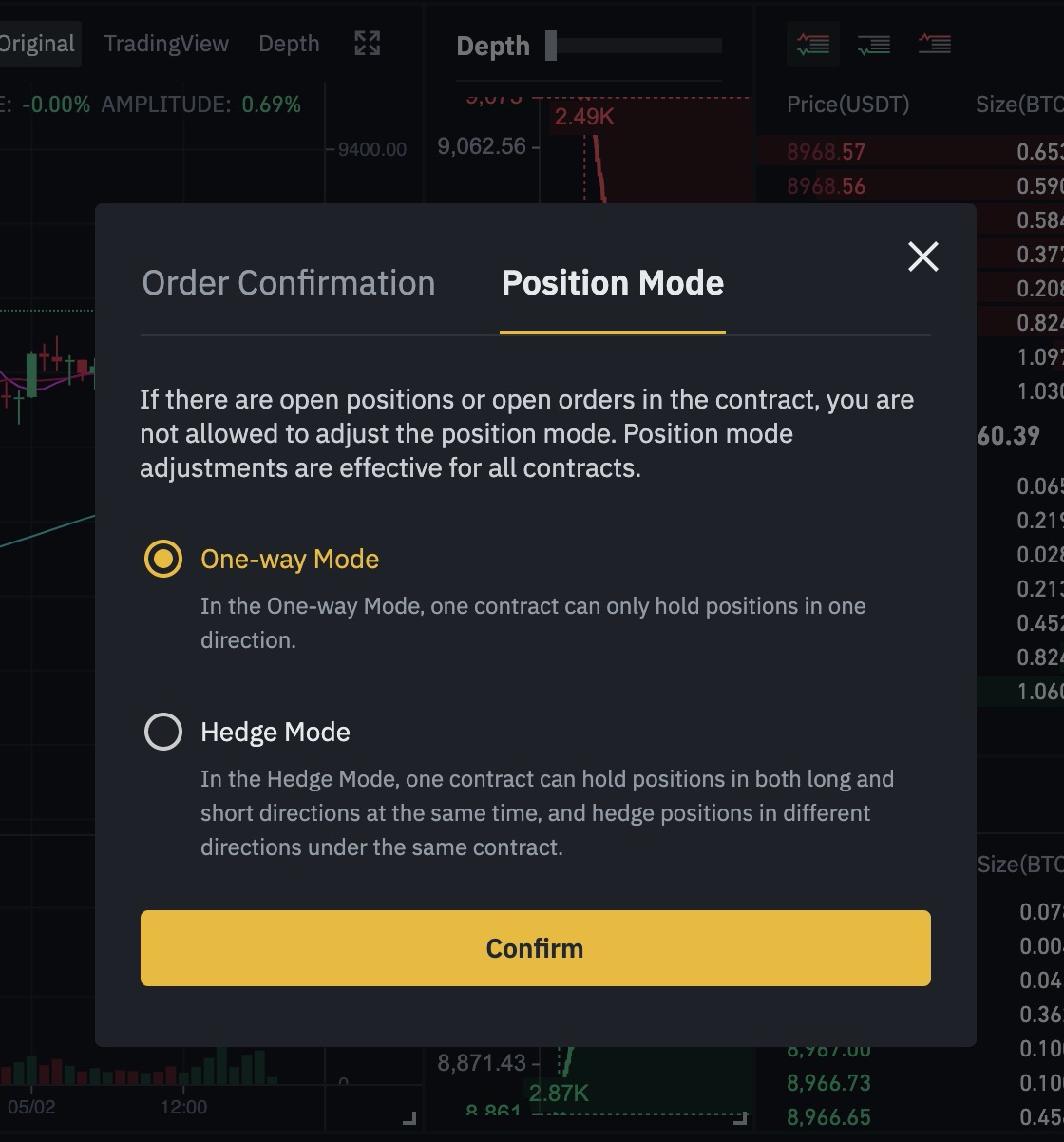
Please disable hedging mode on your binance account and try to start your strategy again.

  1. Login to you Binance futures account

  2. Go to Perferences

  3. Swithch to Position mode tab

  4. Select One-way-Mode

4. I have connection error. Binance API is not responding

Next: 5. How to launch several Futures strategies at the same time?

Still need help? Message GT Protocol support →

A conversational Web3 Crypto AI execution technology that provides you with access to CeFi, DeFi, and NFT crypto markets through an all-in-one conversational AI interface.

A conversational Web3 Crypto AI execution technology that provides you with access to CeFi, DeFi, and NFT crypto markets through an all-in-one conversational AI interface.

Socials
  • News Channel
  • Global Official Chat
  • Twitter
  • Linkedin
  • Medium
  • CoinMarketCap
Navigation
  • Use Cases
  • Technology
  • $GTAI
  • For Devs
  • Partners
  • Team
  • Careers
  • Blog
  • Learn
  • Knowledge Base
  • FAQ
Contacts
  • Contact us
  • [email protected]
  • Brand Kit
Privacy policyTerms of service
Powered by Robosoft
Copyright ©2026 GT Protocol. All rights reserved.